Keyways
|
Mode |
Tool |
Tool set |
|
Modes for Narzędzie Wstaw symbol |
Keyway
|
Detailing |

Click the tool and mode.
Kliknij, aby pokazać/ukryć parametry. place the object, and click again to set the rotation. The first time you use the tool in a file, a properties dialog box opens. Set the default parameters. The parameters can be edited later from the Object Info palette.
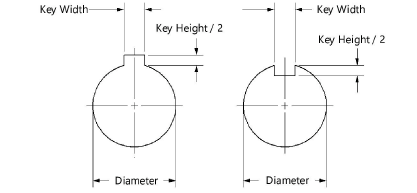
Kliknij, aby pokazać/ukryć parametry.Kliknij, aby pokazać/ukryć parametry.
|
Parameter |
Description |
|
Shaft/Bore Diameter |
Enter the diameter of the shaft or bore |
|
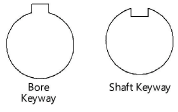
Type of Keyway |
Select one of the keyway types
|
|
Key Standard |
Select inch or metric for the key size standard |
|
Type of Key |
Select a square, rectangular, or woodruff key shape |
|
Use Recommended Key Size |
Uses the recommended ASME/ISO size based on the diameter and key type; deselect to specify custom width and height values |
|
Key Width/Height |
For custom keyway sizes, enter the width and height values |
|
Nom, Size (in./mm) |
Select the nominal bore diameter size for the selected Key Standard (Object Properties dialog box only) |
|
Show Center Line |
Draws the keyway with center lines |

Potrzebujesz więcej informacji? Poproś o pomoc naszego wirtualnego asystenta Dexa!