U-bolts
|
Mode |
Tool |
Tool set |
|
Modes for Het gereedschap ‘Plaats symbool’ |
U-Bolt
|
Fasteners |

The U-Bolt tool and U-Bolt - 3D tool share the same position on the tool set. Click and hold the mouse on the visible tool to open the Subsets list and select the desired tool.
See Definities voor ingebouwde plug-in objecten aanpassen for instructions on establishing custom object sizes.
To insert a U-bolt:
Click the tool and mode.
Click to place the object, and click again to set the rotation. The first time you use the tool in a file, a properties dialog box opens. Set the default parameters. The parameters can be edited later from the Object Info palette.
Click to show/hide the parameters.Click to show/hide the parameters.
|
Parameter |
Description |
|
Size |
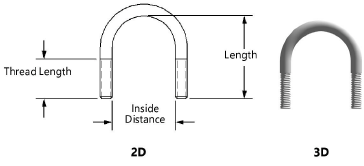
Specify the U-bolt size in diameter/threads per inch (imperial) or diameter/thread pitch (metric) |
|
Inside Distance |
Specify the inside distance between the ends of the U-bolt |
|
Length |
Specify the length from the inner portion of the “U” to the end of the legs |
|
Thread Length |
Specify the thread length |
|
Thread Style (2D only) |
Select the thread style; see Fastener object thread styles |
|
View (2D only) |
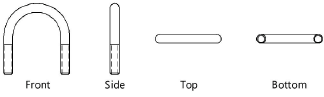
Select the 2D view
|
|
Show Center Line (2D only) |
Draws the U-bolt with center line(s) |
|
Place Locus at Center |
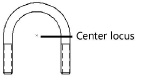
Draws the U-bolt with a center locus
|
|
Show Threads (3D only) |
Draws the U-bolt with threads
|


Niet gevonden wat je zocht? Vraag het aan onze virtuele assistent Dex.